Ana Argüezo

case study / product design

Jamba Juice

How might we improve mobile ordering for busy lives?

Jamba Juice is known for its made-to-order smoothies and on-the-go meals. During this group UX project, I partnered with two other designers to reimagine the mobile ordering experience with a focus on one question:


How might we help healthcare staff with demanding jobs grab a bite to eat and their colleagues without disrupting their demanding schedules?

2

2

2
2

2

2

3

3

3
3

3

3

3

3

3

1

1

1
1

1

1

1

1

1

2

2

2

My Role

This was a team project with 2 other designers. My role included:


  • facilitating workshops
  • selecting research methods
  • user testing
  • prototyping

The Challenge

The original prompt was broad: “Improve a food delivery mobile ordering experience.”

We knew we couldn’t fix everything at once, so started by creating an assumptions map to focus our efforts.


Since this project took place during the pandemic, we chose to focus our design for hospital workers—people who need fast, reliable nourishment but have little time to order for themselves, let alone a group.

The Problem

A busy worker needs an efficient way to order menu items for their group of colleagues so they don’t have to deal with the hassle of making sure everyone pays their fiar share or gets the correct order before they need get back to their work duties.

The Solution

Our solution is to:

  • Optimize group ordering by allowing users to collaborate. Each can order, edit, and pay for their portion.
  • Include recommendations to speed up their order time
  • Improve order status communication

Key Features &

UX Improvements
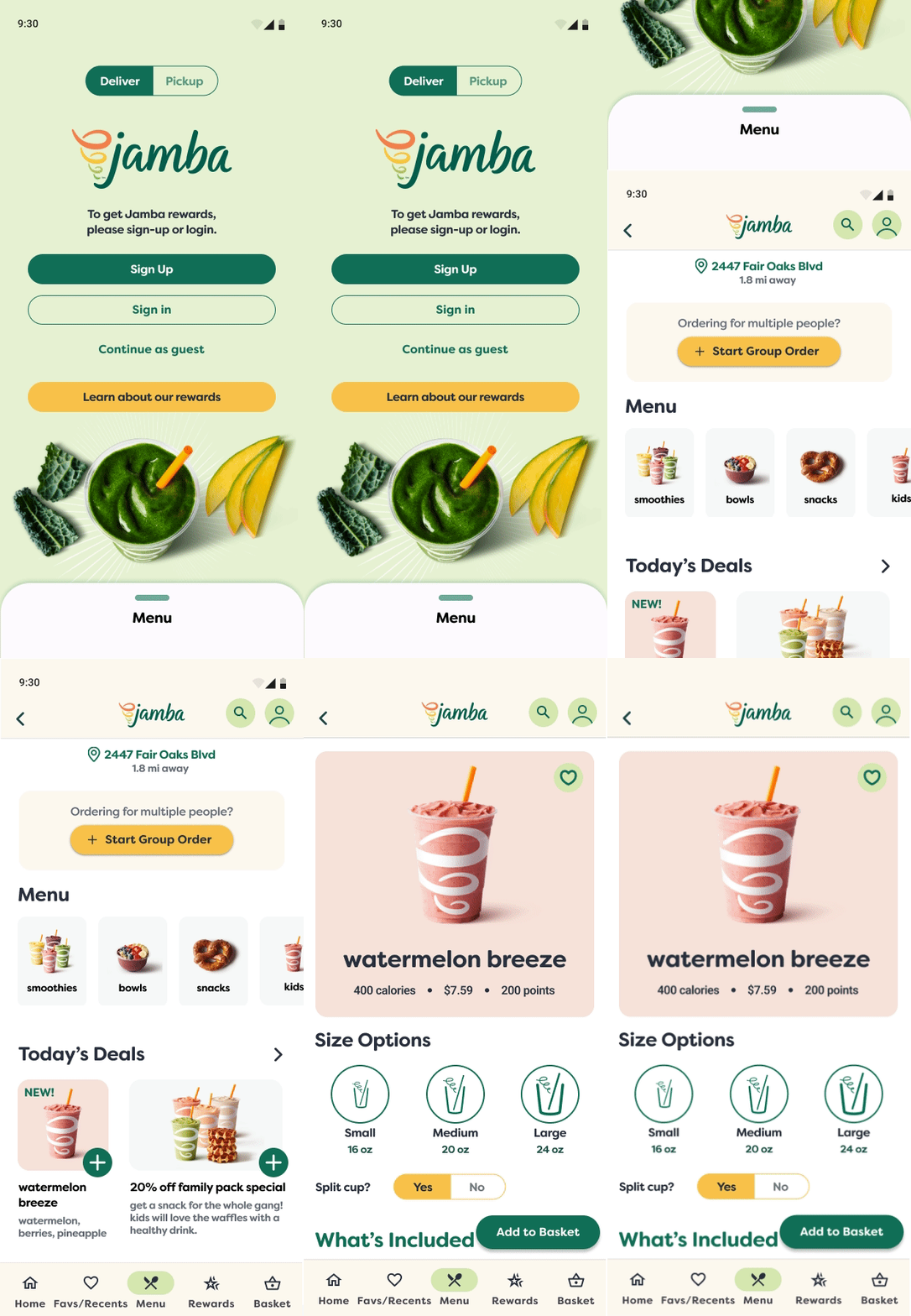
Clearer Menu Access & Personalized Recommendations

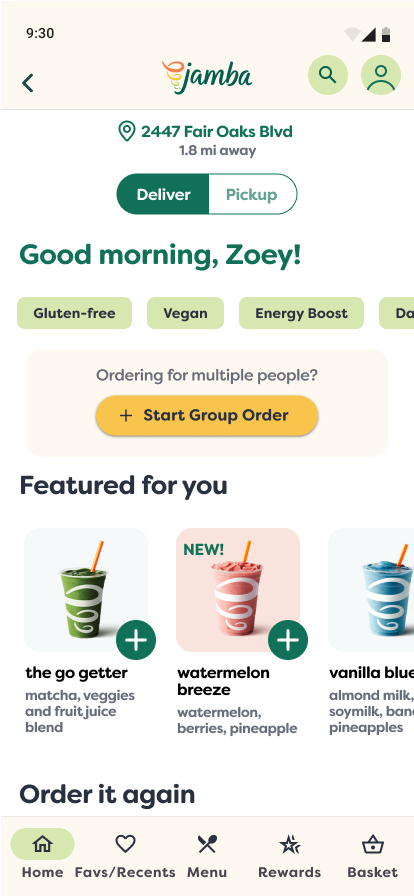
Before: users had to tap multiple times just to find the menu and lacked clear guidance on what to order


Now: a swipe-able menu appears on the landing page. Contextual suggestions & reorder buttons reduce decision time.

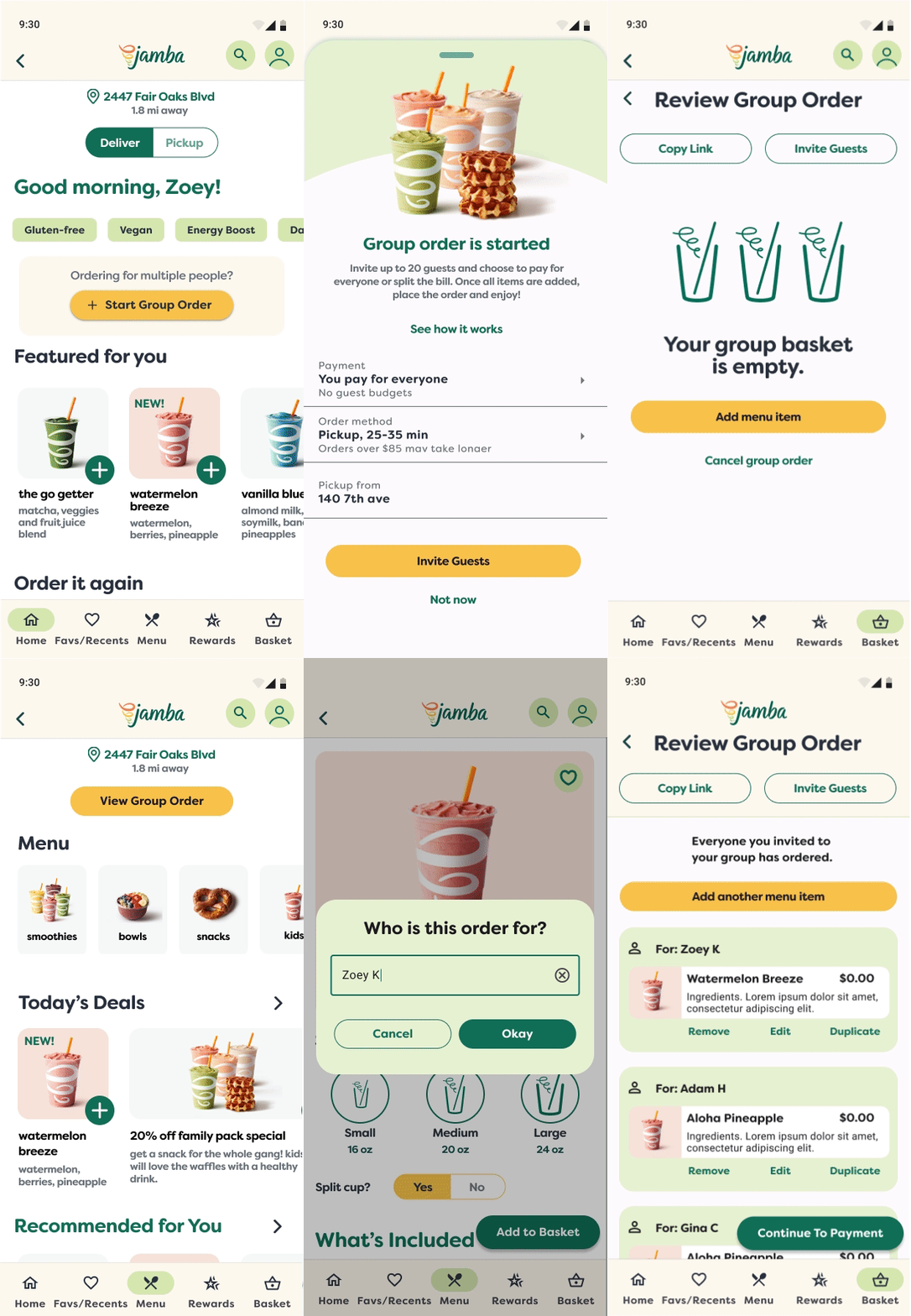
Seamless Group Orders

Before: Hosts coordinated orders with others in their group manually through texts and screenshots.


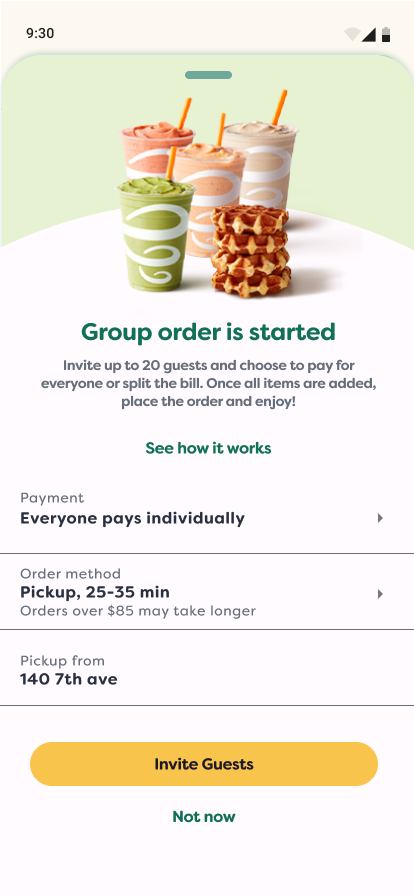
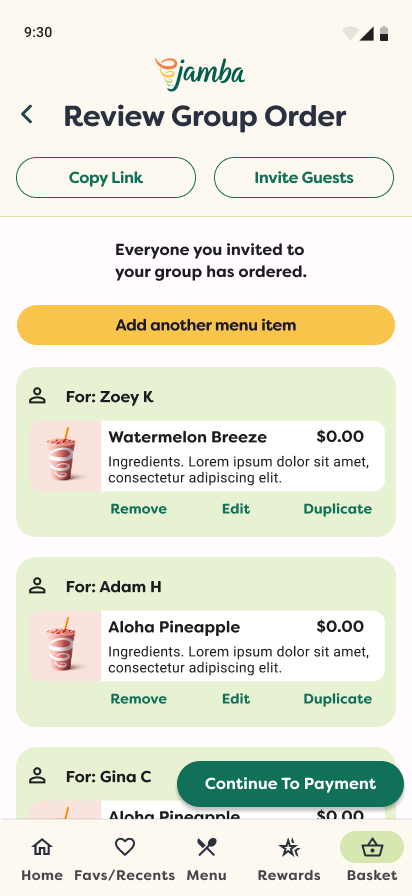
Now: With the new group ordering feature, users in a group can either check out individually or let the host handle the checkout for the entire group.


In both host and individual checkout modes, the host can share a link for individuals to place their own orders. Additionally, the host can add and label orders on behalf of others.
Real-Time Status Updates

Before: In the previous version, users needed to navigate through various links to locate their order status.

After: A persistet timeline widget shows order progress, with arrival notifications and a “Mark as Here” feature to speed up pickup.

Research & Discovery

We took a multi-method approach to understanding our users and their pain points:

  • Desk research & app reviews revealed common frustrations: unclear menus, customization issues, and status uncertainty.
  • Contextual inquiries gave us insight into real ordering behavior.
  • User interviews helped validate assumptions and surfaced key needs around trust, speed, and group coordination.


To synthesize findings, we used a Value Proposition Canvas, mapping jobs, pains, and gains from functional and emotional perspectives.

Product & Services

  1. Order item customization
  2. Trustworthy ratings
  3. Editing orders
  4. Store location finder
  5. Order accuracy
  6. Show store hours and items available
  7. Suggested Items

Pain Relievers

  1. Customize easily
  2. Transparent ingredients
  3. Instant support
  4. Accurate info: hours, menu
  5. Easier app ordering

Gain Creators

  1. Live assistance
  2. Status updates
  3. Easy to use rewards
  4. Ability to split bill
  5. Inclusive dietary options
  6. Help making choices
  7. Group order discounts
  8. Safety measures used

MARKET

FIT

Main Gains:

  1. Accurate and reliable orders
  2. Good deals and rewards
  3. Convenience
  4. Healthy Choices

Main Pains:

  1. Long wait times
  2. Group order issues
  3. App bugs and reporting
  4. Missing items

Main Jobs:

  1. Get clear info and update
  2. Organized group orders
  3. Customize orders
  4. Pickup quickly and safely

Key Insights That Guided Design

I carried out five think-aloud interviews with avid extreme sports enthusiasts. They were tasked with navigating the current Red Bull TV platform while sharing their thoughts out loud.


Here are some key insights gathered during the testing of the current app:

From Ideas To Solutions

We began by mapping a user flow to visualize a simplified experience from browsing to pick-up. Then we built and tested low-fidelity wireframes through three rounds of unmoderated usability testing in Maze.


Some early explorations—like a multi-step group flow—were too complex. Users misunderstood steps or missed key actions. We simplified the flow and added orientation copy to clarify what to do next.
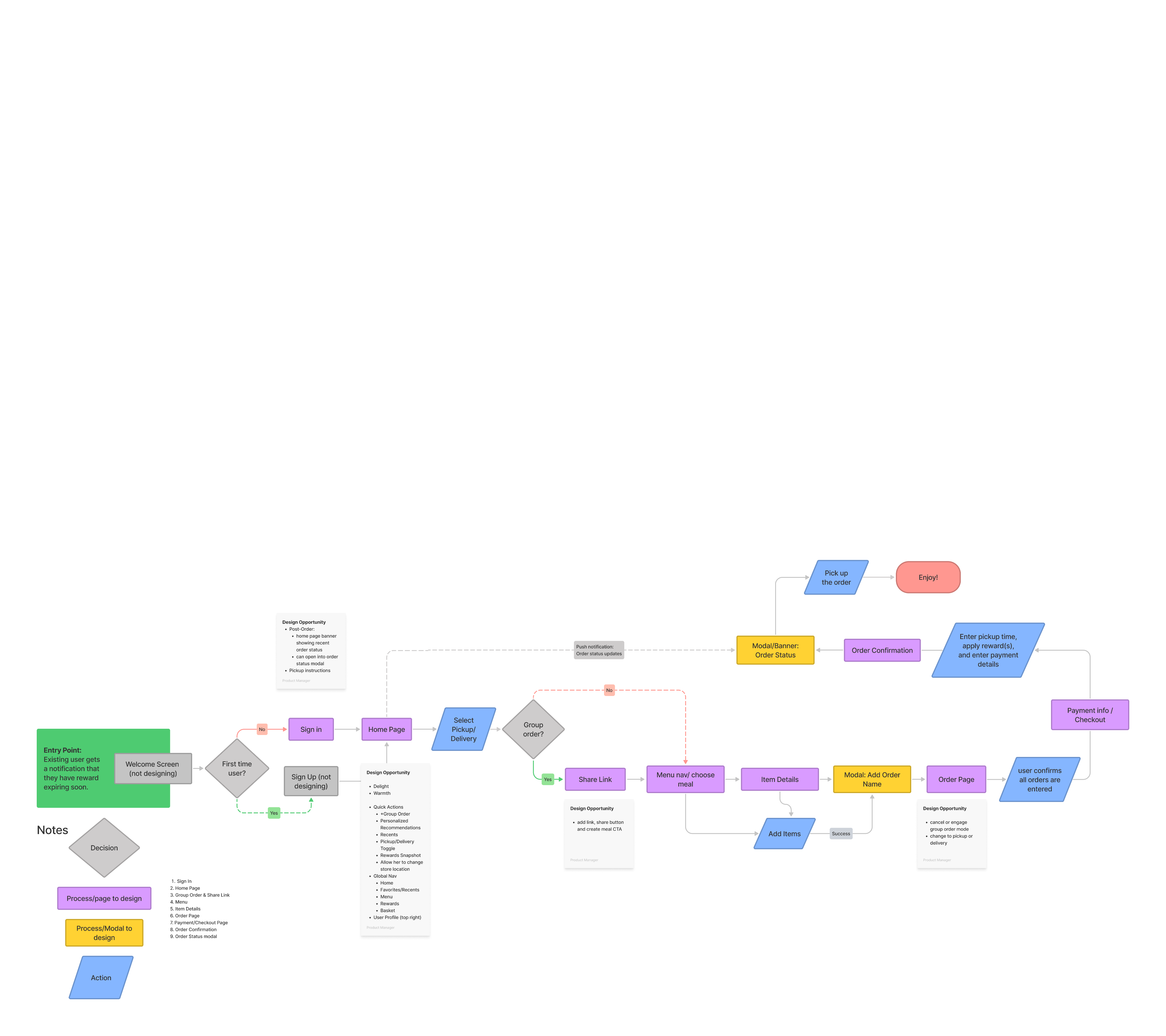
Next, created low-fidelity wireframes for the ordering process and conducted three rounds of unmoderated usability testing using Maze.


Some early explorations—like a multi-step group flow—were too complex. Users misunderstood steps or missed key actions. We simplified the flow and added orientation copy to clarify what to do next.

Prototype

If implemented, we would measure success by:


  • Order speed & conversions: Increased use of recommendations and reorders
  • Group order participation: Frequency and accuracy of group orders
  • User trust & satisfaction: Fewer order complaints and improved app ratings

Final Thoughts

This project taught us how strategy, collaboration, and feedback-driven iteration can turn a broad prompt into a focused, user-centered solution. From research to prototypes, every decision was grounded in solving real problems for real users.

Let’s work together

Ana Argüezo

case study / product design

Jamba Juice

How might we improve mobile ordering for busy lives?

Jamba Juice is known for its made-to-order smoothies and on-the-go meals. During this group UX project, I partnered with two other designers to reimagine the mobile ordering experience with a focus on one question:


How might we help healthcare staff with demanding jobs grab a bite to eat and their colleagues without disrupting their demanding schedules?

2

2

2

2

2

2

3

3

3

3

3

3

3

3

3

1

1

1

1

1

1

1

1

1

2

2

2

The Challenge

The original prompt was broad: “Improve a food delivery mobile ordering experience.”

We knew we couldn’t fix everything at once, so started by creating an assumptions map to focus our efforts.


Since this project took place during the pandemic, we chose to focus our design for hospital workers—people who need fast, reliable nourishment but have little time to order for themselves, let alone a group.

My Role

This was a team project with 2 other designers. My role included:


  • facilitating workshops
  • selecting research methods
  • user testing
  • prototyping

The Problem

A busy worker needs an efficient way to order menu items for their group of colleagues so they don’t have to deal with the hassle of making sure everyone pays their fiar share or gets the correct order before they need get back to their work duties.

The Solution

Our solution is to:

  • Optimize group ordering by allowing users to collaborate. Each can order, edit, and pay for their portion.
  • Include recommendations to speed up their order time
  • Improve order status communication

Key Features & UX Improvements

Clearer Menu Access & Personalized Recommendations

Before: users had to tap multiple times just to find the menu and lacked clear guidance on what to order


Now: a swipe-able menu appears on the landing page. Contextual suggestions & reorder buttons reduce decision time.

Seamless Group Orders

Before: Hosts coordinated orders with others in their group manually through texts and screenshots.


Now: With the new group ordering feature, users in a group can either check out individually or let the host handle the checkout for the entire group.


In both host and individual checkout modes, the host can share a link for individuals to place their own orders. Additionally, the host can add and label orders on behalf of others.

Real-Time Status Updates

Before: In the previous version, users needed to navigate through various links to locate their order status.

After: A persistet timeline widget shows order progress, with arrival notifications and a “Mark as Here” feature to speed up pickup.

Research & Discovery

We took a multi-method approach to understanding our users and their pain points:

  • Desk research & app reviews revealed common frustrations: unclear menus, customization issues, and status uncertainty.
  • Contextual inquiries gave us insight into real ordering behavior.
  • User interviews helped validate assumptions and surfaced key needs around trust, speed, and group coordination.


To synthesize findings, we used a Value Proposition Canvas, mapping jobs, pains, and gains from functional and emotional perspectives.

Product & Services

  1. Order item customization
  2. Trustworthy ratings
  3. Editing orders
  4. Store location finder
  5. Order accuracy
  6. Show store hours and items available
  7. Suggested Items

Pain Relievers

  1. Customize easily
  2. Transparent ingredients
  3. Instant support
  4. Accurate info: hours, menu
  5. Easier app ordering

Gain Creators

  1. Live assistance
  2. Status updates
  3. Easy to use rewards
  4. Ability to split bill
  5. Inclusive dietary options
  6. Help making choices
  7. Group order discounts
  8. Safety measures used

MARKET

FIT

Main Gains:

  1. Accurate and reliable orders
  2. Good deals and rewards
  3. Convenience
  4. Healthy Choices

Main Pains:

  1. Long wait times
  2. Group order issues
  3. App bugs and reporting
  4. Missing items

Main Jobs:

  1. Get clear info and update
  2. Organized group orders
  3. Customize orders
  4. Pickup quickly and safely

Key Insights That Guided Design

From our research, three strong opportunities emerged:

  • Personalization boosts efficiency. Users respond to reorder options and relevant suggestions.
  • Group ordering must be easy. Coordinating large custom orders is stressful without the right tools.
  • Transparency builds trust. Clear, timely order updates reduce friction and boost reliability.

From Ideas To Solutions

We began by mapping a user flow to visualize a simplified experience from browsing to pick-up. Then we built and tested low-fidelity wireframes through three rounds of unmoderated usability testing in Maze.


Some early explorations—like a multi-step group flow—were too complex. Users misunderstood steps or missed key actions. We simplified the flow and added orientation copy to clarify what to do next.

Prototype

Results

If implemented, we would measure success by:


  • Order speed & conversions: Increased use of recommendations and reorders
  • Group order participation: Frequency and accuracy of group orders
  • User trust & satisfaction: Fewer order complaints and improved app ratings

Lessons & Reflections

  • Exploration is essential, but feedback is the filter. Some ideas felt promising but didn’t test well. We learned to let go and refocus.
  • Workshops kept us aligned. Weekly retros and collaboration tools like Miro helped us stay on track while working remotely.
  • Design requires flexibility. After early inconsistencies, we restructured our tasks by strength, two of us focused on research synthesis, two on iterating wireframes.
  • Usability testing must be verified. One early Maze test was launched without QA, leading to skewed results and a valuable lesson in testing preparation.

Final Thoughts

This project taught us how strategy, collaboration, and feedback-driven iteration can turn a broad prompt into a focused, user-centered solution. From research to prototypes, every decision was grounded in solving real problems for real users.

More Projects:

Jakroo

2025

Headspace

2023

Jamba Juice

2022

Let’s work together

Ana Argüezo

case study / product design

Jamba Juice

How might we improve mobile ordering for busy lives?

Jamba Juice is known for its made-to-order smoothies and on-the-go meals. During this group UX project, I partnered with two other designers to reimagine the mobile ordering experience with a focus on one question:


How can we assist healthcare workers with busy schedules in obtaining nourishing meals without interrupting their demanding work day?

2

2

2

2

2

2

3

3

3

3

3

3

3

3

3

1

1

1

1

1

1

1

1

1

2

2

2

The Challenge

The initial prompt was broad: "Enhance Jamba Juice’s mobile ordering experience." To refine our focus, we analyzed online reviews to identify common complaints, which helped us create an assumptions map to prioritize our efforts.


This project unfolded during the COVID pandemic, a time when online ordering surged and hospital workers required more support than ever. They needed quick, reliable nourishment but had little time for their own needs.


Our goal was to develop a mobile experience that would assist them by offering an easy way to order for themselves or their teams, along with clear updates on when their orders would be ready for pickup.

My Role

This was a team project with 2 other designers. My role included:


  • facilitating workshops
  • selecting research methods
  • user testing
  • prototyping

The Problem

Hospital staff often face tight schedules with limited breaks, making it crucial for them to manage group orders efficiently. The existing system only supports individual orders, complicating coordination and splitting payments, which adds stress during brief breaks. Additionally, it lacks real-time status updates, hindering their ability to optimize time and access necessary nourishment.

The Solution

Our solution is to:

  • Optimize group ordering by allowing users to collaborate. Each user can order, edit, and pay for their portion.
  • Include recommendations to speed up their order time
  • Enhance trust by sharing clear order preparation updates, reducing customer uncertainty

Key Features and UX Improvements

Clearer Menu Access & Personalized Recommendations

Before: users had to tap multiple times just to find the menu and lacked clear guidance on what to order


Now: a swipe-able menu appears on the landing page. Contextual suggestions & reorder buttons reduce decision time.

Seamless Group Orders

Before: Hosts coordinated orders with others in their group manually through texts and screenshots.


Now: With the new group ordering feature, users in a group can either check out individually or let the host handle the checkout for the entire group.


In both host and individual checkout modes, the host can share a link for individuals to place their own orders. Additionally, the host can add and label orders on behalf of others.

Real-Time Status Updates

Before: In the previous version, users needed to navigate through various links to locate their order status.

After: A persistet timeline widget shows order progress, with arrival notifications and a “Mark as Here” feature to speed up pickup.

Research & Discovery

We took a multi-method approach to understanding our users and their pain points:

  • Desk research & app reviews revealed common frustrations: unclear menus, customization issues, and status uncertainty.
  • Contextual inquiries gave us insight into real ordering behavior.
  • User interviews helped validate assumptions and surfaced key needs around trust, speed, and group coordination.


To synthesize findings, we used a Value Proposition Canvas, mapping jobs, pains, and gains from functional and emotional perspectives.

Product & Services

  1. Order item customization
  2. Trustworthy ratings
  3. Editing orders
  4. Store location finder
  5. Order accuracy
  6. Show store hours and items available
  7. Suggested Items

Pain Relievers

  1. Customize easily
  2. Transparent ingredients
  3. Instant support
  4. Accurate info: hours, menu
  5. Easier app ordering

Gain Creators

  1. Live assistance
  2. Status updates
  3. Easy to use rewards
  4. Ability to split bill
  5. Inclusive dietary options
  6. Help making choices
  7. Group order discounts
  8. Safety measures used

MARKET

FIT

Main Gains:

  1. Accurate and reliable orders
  2. Good deals and rewards
  3. Convenience
  4. Healthy Choices

Main Pains:

  1. Long wait times
  2. Group order issues
  3. App bugs and reporting
  4. Missing items

Main Jobs:

  1. Get clear info and update
  2. Organized group orders
  3. Customize orders
  4. Pickup quickly and safely

Key Insights That Guided Design

From our research, three strong opportunities emerged:

  • Personalization boosts efficiency. Users respond to reorder options and relevant suggestions.
  • Group ordering must be easy. Coordinating large custom orders is stressful without the right tools.
  • Transparency builds trust. Clear, timely order updates reduce friction and boost reliability.

From Ideas To Solutions

We began designing by mapping a user flow to visualize a simple version of the experience as a whole, from opening the app to picking up their order.

Next, created low-fidelity wireframes for the ordering process and conducted three rounds of unmoderated usability testing using Maze.


Some early explorations—like a multi-step group flow—were too complex. Users misunderstood steps or missed key actions. We simplified the flow and added orientation copy to clarify what to do next.

Results

If implemented, we would measure success by:


  • Order speed & conversions: Increased use of recommendations and reorders
  • Group order participation: Frequency and accuracy of group orders
  • User trust & satisfaction: Fewer order complaints and improved app ratings

Lessons & Reflections

  • Exploration is essential, but feedback is the filter. Some ideas felt promising but didn’t test well. We learned to let go and refocus.
  • Workshops kept us aligned. Weekly retros and collaboration tools like Miro helped us stay on track while working remotely.
  • Design requires flexibility. After early inconsistencies, we restructured our tasks by strength, two of us focused on research synthesis, two on iterating wireframes.
  • Usability testing must be verified. One early Maze test was launched without QA, leading to skewed results and a valuable lesson in testing preparation.

Final Thoughts

This project taught us how strategy, collaboration, and feedback-driven iteration can turn a broad prompt into a focused, user-centered solution. From research to prototypes, every decision was grounded in solving real problems for real users.

More Projects:

Jakroo

2025

Headspace

2023

Jamba Juice

2022